ACORD 125 Guide: How to Complete the Commercial Insurance Application
The ACORD 125 Commercial Insurance Application is the foundational data behind most commercial quotes. If it’s incomplete, inconsistent, or vague, the result is familiar to every independent agent: underwriting follow-ups, delayed quotes, or outright rejections.
Under time pressure to bind coverage, the ACORD 125 can feel less like a form and more like an obstacle. Fret not, this guide is a go-to desk reference for independent agents – something you can keep open while you fill out the PDF or enter data into an Agency Management System (AMS).
Rather than simply telling you what to type into each box, this article explains what underwriters actually look for, why certain fields matter more than others, and where applications most commonly get kicked back.
By the end, you should be able to complete the ACORD 125 accurately, attach the right supplemental forms, and submit an application package that moves swiftly through underwriting and toward a bindable quote.
- The ACORD 125 is the standard Applicant Information section used for most commercial insurance applications and acts as a key data source for other attached forms. It helps obtain entity details, such as LLC (Limited Liability Company) status, Partnership/Joint Venture arrangements, ownership structure, and party interests, which flow downstream to all related applications.
- Certain fields – such as Named Insured, FEIN, Lines of Business, and Loss History – are underwriting “danger zones” and the most common sources of delays. Especially when producer code or sub-code entries are incorrect, entity details do not align with ownership disclosures, or notes in the remarks section are missing or incomplete.
- Checking a Line of Business (LOB) box signals to the underwriter that the corresponding forms and supporting information are included. Required attachments vary by carrier and line of business and may include ACORD 126 (Liability), ACORD 140 (Property), Crime Section (ACORD 141,where applicable or when required by the carrier ), or Equipment Floater (ACORD 146) when applicable, based on exposure or carrier requirements.
- Accuracy on the front end directly impacts speed-to-quote and reduces E&O exposure. Small errors – such as misidentifying entity type or omitting an additional insured/certificate holder – can ripple across every attached form and slow underwriting review.
Independent Agents!
Accelerate Your Agency’s Success
 Instant Access
 No Fees
 Top Commissions
What is the ACORD 125 Commercial Insurance Application?
The ACORD 125 is the standard Commercial Insurance Application used to collect general applicant and business information for commercial lines policies. Often referred to as the Applicant Information Section, it captures the foundational data underwriters rely on to evaluate risk across multiple coverages.
In practice, the ACORD 125 functions as the cover sheet for a commercial insurance submission. While it contains critical information about the named insured, operations, locations, and prior insurance, it rarely stands alone.
Instead, it sits on top of line-of-business-specific forms that collect the detailed risk data underwriters need.
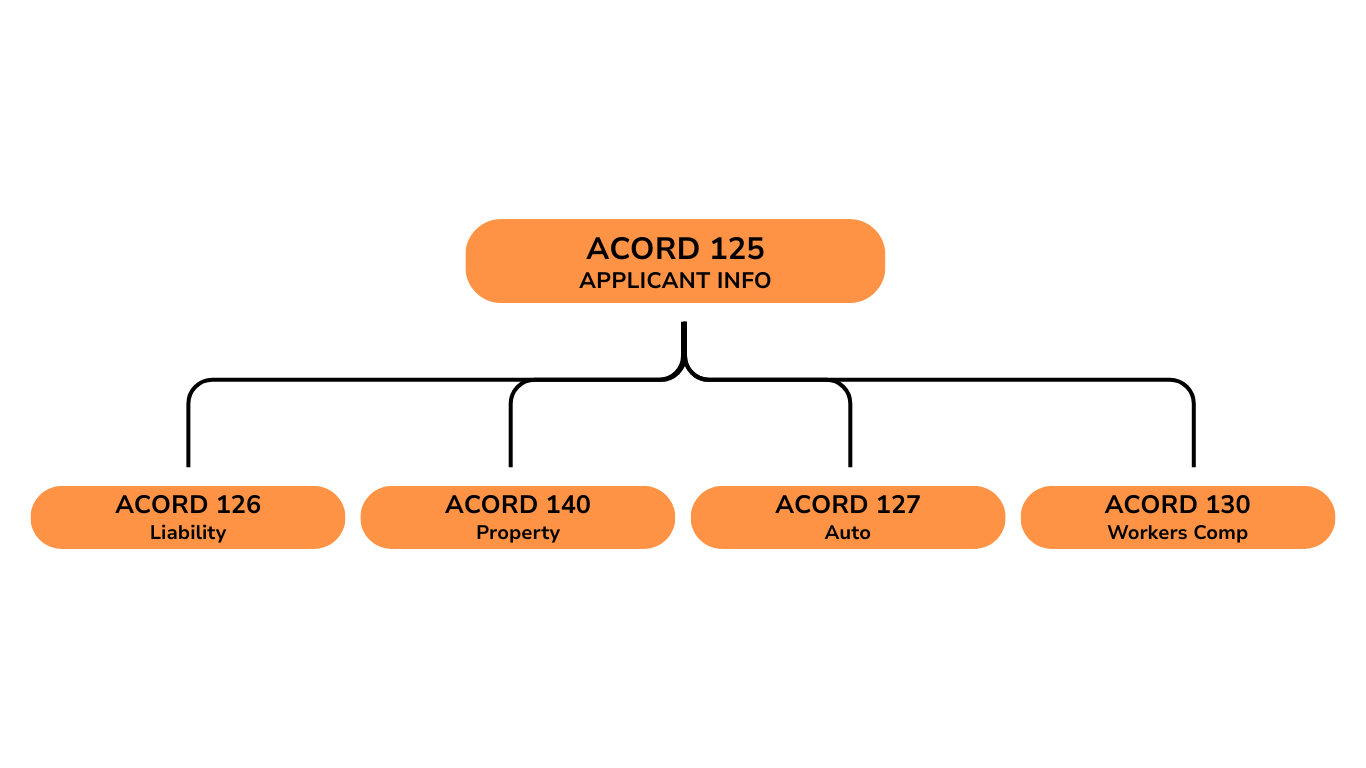
The “Application Stack”: Understanding Required Attachments
Many newer commercial agents often mistakenly assume that the ACORD 125 is enough by itself.
However, this isn’t the case. While underwriters use ACORD 125 to understand who the applicant is, they rely on additional ACORD forms to understand what is being insured.
Think of the ACORD 125 as the spine of the application. Each additional form is a chapter that dives into a specific exposure. If a Line of Business is indicated on the 125, the underwriter will expect the corresponding details elsewhere in the application stack.
| If Client Needs… | Attach This Form |
| General Liability | ACORD 126 |
| Property | ACORD 140 |
| Business Auto | ACORD 127 |
| Workers Compensation | ACORD 130 |
| Umbrella / Excess | ACORD 131 |
ACORD 126 (General Liability)
The ACORD 126 obtains detailed information for commercial general liability coverage. This includes operations, classifications, payroll or sales estimates, and the Schedule of Hazards.
It expands on the high-level business description provided in the ACORD 125 and is one of the most frequently attached forms.
ACORD 140 (Property)
The ACORD 140 property section is used to insure buildings and business personal property. It details construction type, occupancy, protection, year built, values, and locations.
Accurate premises information on the ACORD 125 is critical because it flows directly into this form.
ACORD 127 (Business Auto)
The ACORD 127 is used for business auto coverage and collects vehicle schedules, radius of operation, and driver information.
In some markets, this form may be replaced or supplemented by proprietary carrier auto applications. However, the exposure data it displays is still required.
ACORD 130 (Workers Comp)
The ACORD 130 supports workers’ compensation coverage and focuses on payroll, employee classifications, and prior experience.
When workers comp is indicated on the ACORD 125, underwriters will expect a completed 130 or equivalent data.
Step-by-Step Guide to Completing the ACORD 125
Although the ACORD 125 may appear simple, several sections routinely cause issues during underwriting review. Walking through the form in the order it is completed helps reduce errors and omissions.
Section 1: Applicant Information and Agency Details
This section establishes the applicant’s identity, and mistakes here affect every form attached to the submission.
Named Insured and Legal Entity
The Named Insured must exactly match the applicant’s legal entity as filed with the state, including punctuation and suffixes such as Inc., LLC, or LP. A mismatch between the Named Insured and the FEIN is one of the most common reasons applications are delayed.
| Field | Sole Proprietor / DBA | Corporation / LLC |
| Named Insured Box | Individual’s Legal Name | Full Legal Entity Name (Inc / LLC exactly) |
| DBA Box | Business Trade Name | DBA only if applicable (otherwise blank) |
| FEIN | SSN or Tax ID (per carrier rules) | Federal Tax ID (FEIN) |
Pro tip: A DBA (Doing Business As) name should only appear in the DBA field, not in the Named Insured box. Whereas, sole proprietors are typically listed under the individual’s legal name, with the DBA shown separately.
FEIN (Tax ID)
The FEIN is the unique identifier carriers use to identify and track submissions across markets. An incorrect FEIN can cause confusion with prior submissions, duplicate records, or underwriting flags.
Therefore, always verify the number before submitting.
Section 2: Lines of Business (LOB)
The Lines of Business section is more than a checklist. Checking a box here signals to the underwriter that the supplemental forms and exposure details are included in the submission.
For instance:
- Checking General Liability implies an ACORD 126 or equivalent data.
- Checking Property implies an ACORD 140 with building and value details.
Pro Tip: Only select lines you are actually submitting. Over-checking LOBs without attachments creates unnecessary follow-ups.
Section 3: General Information and Coding
This stage contains abbreviations and codes that directly affect billing, commissions, and workflow.
| Feature | Agency Bill (Code A) | Direct Bill (Code D) |
| Payment Responsibility | Agent collects from client | Carrier bills client directly |
| Commission Timing | Often retained at time of payment | Paid by carrier per commission cycle |
| Carrier Interaction | Agent handles most billing issues | Client interacts directly with carrier |
Billing Plan
Two common billing plan codes appear on the ACORD 125:
- Agency Bill (Code A): The agency collects premiums from the client and remits payment to the carrier.
- Direct Bill (Code D): The carrier bills the insured directly.
Selecting the wrong billing plan can delay binding or create accounting issues.
Additional Coding Fields
This section may also include:
- NAICS or SIC codes, which classify the business operation
- Policy period and effective date
- Inspection contact information
Underwriters use these fields to assess risk appetite and route the submission correctly.
Section 4: Prior Carrier Information & Loss History
This part often causes the most anxiety – especially for new ventures.
Prior Carrier Information
If the applicant has prior coverage, list:
- Carrier name
- Policy number
- Effective and expiration dates
However, if the business has no prior insurance, don’t leave the section blank – it may often lead to a follow-up request. Instead, you should enter “New Venture.”
It’s also important to note that some carriers may also require a signed no-loss statement for new ventures to confirm the absence of prior claims.
Loss History
Underwriters typically require currently valued loss runs, not just a checked “No Losses” box. Loss runs should reflect updated reserves and payments, typically within the last 60–90 days, depending on carrier requirements.
Pro Tip: Uploading loss runs upfront reduces underwriting back-and-forth and speeds up the quote process.
3 Common ACORD 125 Mistakes That Get Applications Rejected
Even experienced agents run into problems with the ACORD 125. These issues may seem small, but to an underwriter, they signal risk, uncertainty, or incomplete documentation.
Not only can they slow down quoting or trigger follow-up emails, but they can also lead to an underwriting rejection that stops the submission from moving forward – whether the application is sent by email or through electronic submission.
Inaccurate FEINs
The Federal Employer Identification Number (FEIN) is among the critical data points on the ACORD 125. An incorrect FEIN can cause the carrier to misidentify the applicant, pull the wrong loss history, or associate the submission with a completely different entity.
This is especially common when numbers are transposed, copied from outdated records, or confused with an owner’s Social Security Number.
Underwriters rely on the FEIN to verify the legal entity type and support accurate risk classification, especially when prior policies include package policies or blanket coverage.
Even a single-digit error can delay or derail the file, so it’s essential to confirm the FEIN directly with the client before submitting.
Vague Description of Operations
Generic descriptions such as “Contractor,” “Consulting,” or “Services” do not give underwriters enough information to properly classify the risk. When operations are unclear, underwriters are forced to make assumptions, which often leads to conservative pricing, requests for clarification, or declinations.
Instead, be specific and descriptive. For example, “Residential Drywall Contractor” is far clearer than “Contractor,” and “IT Consulting – No Hardware Sales” immediately narrows the exposure.
Clear, precise descriptions help underwriters assign the correct class codes and evaluate the risk accurately the first time.
Missing Signatures
A missing signature is not a clerical oversight – it is a legal issue. Most carriers enforce a strict signature requirement and will not bind coverage without a signed application and fraud statement.
While some carriers may quote without a signature, most will not bind coverage without a signed application and fraud statement. Before sending any submission, always verify that all required signatures and dates are present to avoid preventable delays.
Beyond the PDF: Streamlining Your Commercial Submissions
By the time you finish the ACORD 125 manually, you’ve likely felt the friction: repetitive data entry, managing multiple PDFs, and emailing the same information to different carriers.
Each submission requires re-entering core details – such as the producer name, agency contact information, and estimated premium volume – even though that data rarely changes from carrier to carrier.
The ACORD 125 remains the industry-standard language for commercial submissions, but manually completing and distributing PDFs is increasingly optional. While workflows may be digital, the underlying ACORD data is still required and often reviewed in ACORD-equivalent format, even if digital.
Modern digital marketplaces allow agents to enter applicant data once and submit it to multiple carriers simultaneously. This includes key underwriting details such as ownership structure, subsidiary relationships, billing preferences, and the selected audit method for workers’ compensation.
Entering this information a single time reduces errors, improves consistency, and helps carriers review submissions more efficiently.
| Step | Traditional PDF Method | FirstConnect Digital Method |
| Data Entry | Manual, repetitive across forms | Single digital entry |
| Carrier Access | Appointment required, limited | Instant access (carrier & line dependent) |
| Submission | Email or portal per carrier | One-click or streamlined submission |
Platforms like FirstConnect help streamline this workflow by:
- Providing instant carrier access (depending on carrier and line of business), even when a direct appointment is not in place
- Reducing repetitive manual data entry across multiple ACORD forms
- Supporting quote and bind functionality (to a select carrier and line of business) within a single platform
It’s important to note that some carriers – particularly in certain E&S markets – still require manual ACORD form submissions, including completed PDFs with wet or electronic signatures.
Digital platforms don’t eliminate ACORDs entirely, but they often significantly reduce the need for manual PDFs, minimize rework, and accelerate the overall submission process.
Get Free Access to 150 Top Partners
Boost Your Agency’s Growth
Instant Access
No Fees
Top Commissions
FAQ
-
Do I need to fill out an ACORD 125 for every commercial client?
Most commercial carriers require the information contained in an ACORD 125, even when it is collected digitally or through an Agency Management System. Whether submitted as a PDF or entered electronically, underwriters review the equivalent of an ACORD 125.
-
What if a client needs additional coverage beyond their primary commercial policies?
Clients may request additional protection, such as Umbrella or Excess Liability to sit above their General Liability, Auto, or Employers Liability limits. In these cases, underwriters may require an ACORD 131or carrier-specific excess application, which provides details specific to umbrella and excess coverage.
-
Is the ACORD 125 still a PDF in today’s commercial workflow?
In many cases, yes – but not always. While fillable PDFs are still widely used, many agencies now rely on AMS platforms and digital marketplaces to capture ACORD 125 data electronically. Even when a PDF isn’t physically completed, the underlying data structure remains the same, and the information is reviewed by underwriters in an ACORD-equivalent format.